
Writing a screenplay
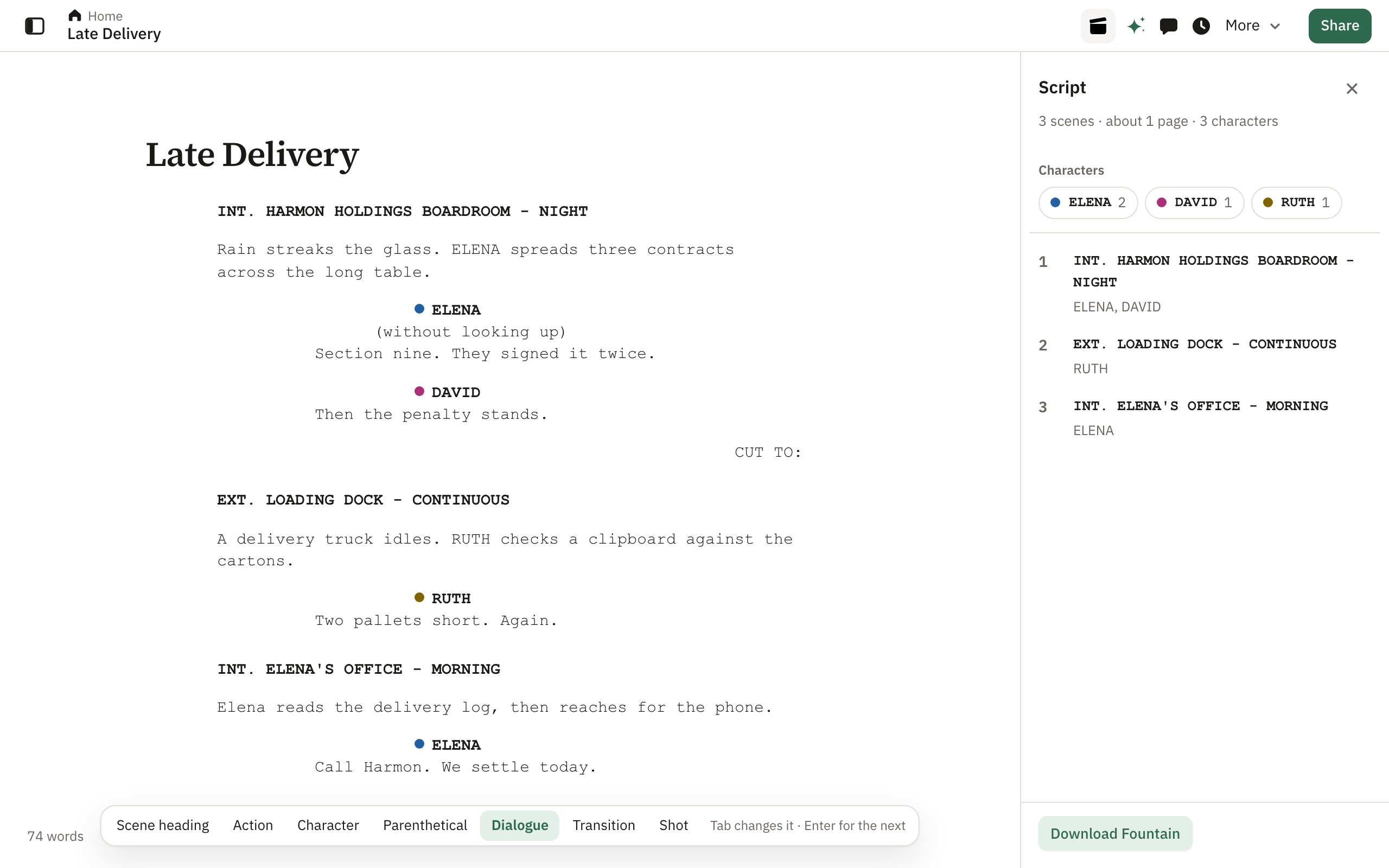
Scripts in the industry layout, with the Script panel, Fountain and Final Draft. On Pro and Enterprise, with production tools on Enterprise.
A screenplay in Pagyra is an ordinary document, so the whole room can write in it at once, leave notes on a line and share it by link. Pagyra takes care of the layout.
Start a script
- On Home, choose Templates, then Screenplay, for a first scene ready to write.
- Or, in any document, type / on an empty line and choose Screenplay.
- Or upload a Fountain (.fountain) or Final Draft (.fdx) file, and keep writing where you left off.
Write it
Each line of a script is an element: Scene heading, Action, Character, Parenthetical, Dialogue, Transition or Shot. While you are on a script line, a bar shows its element and lets you choose another.
| Enter | Start the element that usually comes next |
| Tab | Change to the next element |
| ShiftTab | Change to the previous element |
- After a character’s name, Enter starts their dialogue; after dialogue, it goes back to action. Pressing Enter on an empty line also goes back to action.
- Type INT. or EXT. at the start of an action line and it becomes a scene heading.
- On a character line, everyone already in the script is suggested, before you type and as you type. On a scene heading, places and times of day are suggested.
- Scene headings, characters, transitions and shots are written in capitals for you.
- Each character keeps their own colour, beside their name throughout the script.
The Script panel
Once a document holds a script, a Script button appears at the top of the page. The panel lists every scene, with how many scenes, characters and roughly how many pages there are. Choose a scene to jump to it, or a character to add their name at the cursor.
Download it
In the Script panel, choose Download Fountain to take the script into other screenwriting apps. Word and PDF downloads keep the screenplay layout.
Gyra in a script
Select a scene and ask Gyra to rewrite it, and what it writes stays in script form. An admin can turn Gyra off in Admin, Gyra.
Production tools on Enterprise
On Enterprise, the Script panel adds production reports for planning the shoot, in tabs for Scenes, Characters and Locations.
- Show scene numbers beside each scene heading, as in a shooting script.
- Characters: each character’s lines, words and the scenes they are in.
- Locations: where scenes happen, inside or out, at what times, and in which scenes.
- Scene breakdown (CSV): one row per scene, with its place, time, characters and length, ready for a schedule.
Screenwriting is on Pro and Enterprise. The production tools are on Enterprise.
Didn’t answer your question? Email support@pagyra.com.